
Small, mostly invisible fixes that make a booking site feel more polished and trustworthy, without you having to notice they exist.
What it does #
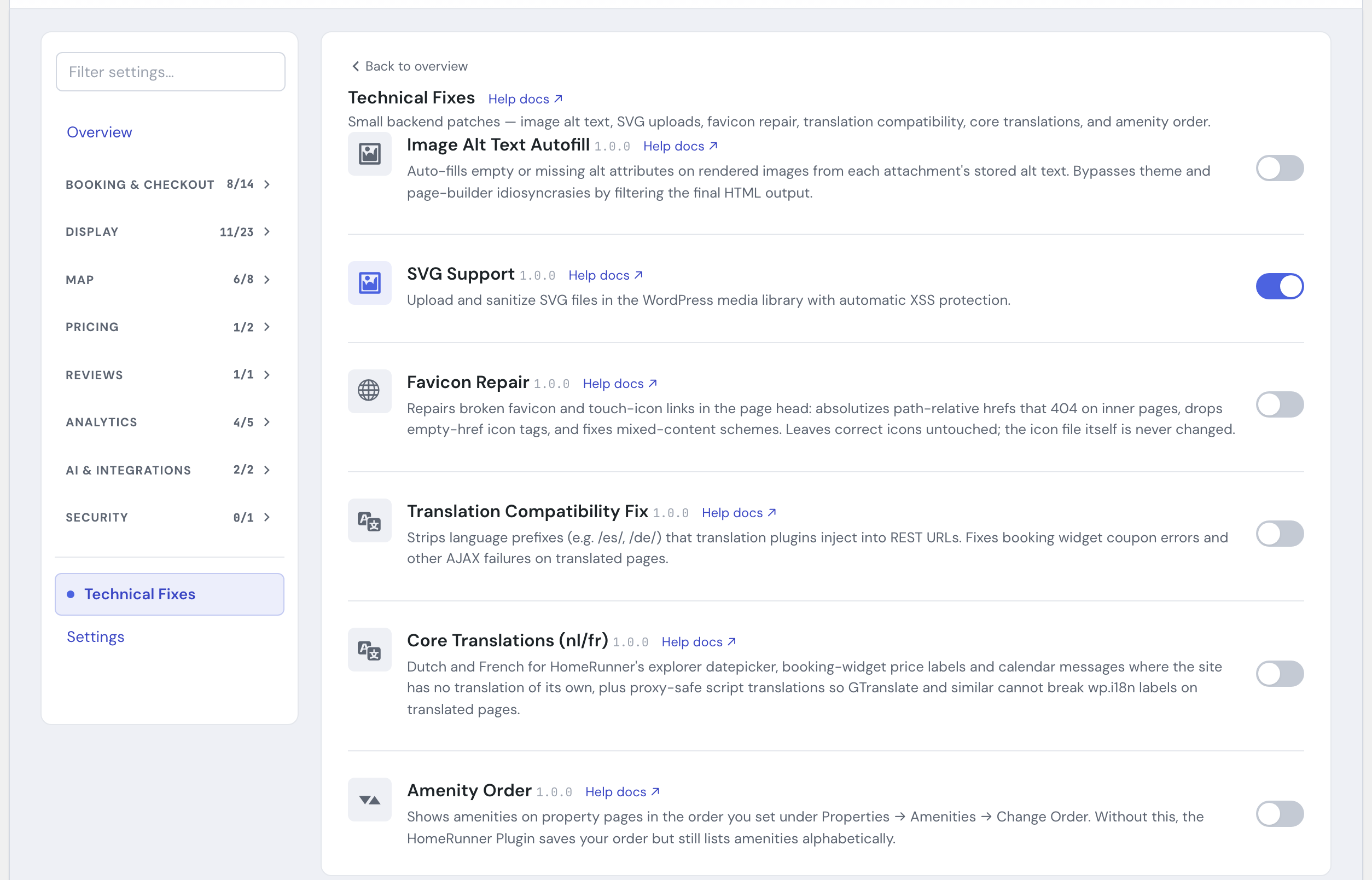
A booking site has rough edges that guests notice but you rarely see: a cryptic error message at checkout, a description that reads as one dense paragraph, a logo that will not upload, a broken site icon on inner pages. The Toolkit ships several small modules that smooth over these problems. Each one is a single on or off switch in the Hub. Most have no settings screen at all: you turn the module on and it works. The one exception is Friendly Error Messages, which also gives you an editable message map (covered below).
Friendly Error Messages, Property Description Formatting, Translation Compatibility Fix, Custom Field HTML Repair, and Rounding Strike Guard ship switched on for brand-new installs. Image Alt Text Autofill, SVG Support, Favicon Repair, Core Translations, and Page Language Guard stay off until you turn them on. Either way, a site that existed before a module became a default keeps whatever state it already had, nothing changes retroactively, and every module is still controlled per site from the Hub. Once one is on, it runs on its own with little or nothing further to configure.
What each module does for your guests:
- Friendly Error Messages. When something goes wrong during a quote or at checkout, the booking system can return terse, technical wording that confuses guests and makes them abandon. Friendly Error Messages replaces those messages, on the booking component, the checkout page, and the property search and explorer pages, with plain, reassuring language that tells the guest what happened and what to do next. It catches both messages shown when the page loads and ones that appear after the guest interacts, so a cryptic failure rarely reaches the screen. If you already have a translation in place for a message, from a language pack or a plugin like Loco Translate or WPML, this module leaves it alone rather than replacing it with its own English wording. This module also has a settings screen in the Hub: an editable message map where you can reword any of the replacement messages or add your own.
- Property Description Formatting. The short description preview above “Show More” on a property page is built by trimming your full description down to its first couple hundred words, and that trimming step used to flatten every paragraph break and bullet line into one dense wall of text, even though the full description in the “Show More” popup was fine. This module rebuilds the preview from your original text so each paragraph and each bullet line keeps its own line, in the same order the popup shows them. It only changes that main preview: the shorter blurbs used elsewhere, such as property-card excerpts and search-engine descriptions, stay as they were. There is nothing to configure. Once the module is on, the preview simply reads the way you wrote the description, still cut off at the same length with the usual trailing dots.
- Translation Compatibility Fix. On sites that offer translated pages with plugins like WPML, Polylang, TranslatePress, GTranslate, or Weglot, the translation plugin can insert a language prefix such as
/es/or/de/into the addresses the booking component relies on. That broke actions like applying a coupon code, which then showed a generic “Internal error” message. This module strips those prefixes so the component keeps working for guests browsing in any language, and it only steps in when one of those translation plugins is actually active, so a site that simply lives in a two-letter subdirectory is left alone. - Custom Field HTML Repair. A PMS custom field that carries HTML, a “Website Notes” field, say, reaches WordPress exactly as your PMS sent it. One formatting tag left open by mistake, a bold tag is the usual one, and the browser re-opens it inside every block that follows, which on a property page can wrap the sticky sidebar in bold text and drop it under the main column. This module closes what was left open (bold, italic, underline, strikethrough, small print, highlight, subscript, superscript, code, and abbreviation tags), removes a stray closing tag that has no opener, and leaves everything else alone: text, links, images, and line breaks pass through as they are, and a field that was already balanced comes out identical. It covers every custom field synced from your PMS, plus any you add with External Custom Fields. Each sync stores the repaired value, and anything not yet re-synced is repaired the moment it is displayed, so existing properties are covered immediately with no cleanup step. All you notice is that the property page holds its layout.
- Rounding Strike Guard. HomeRunner’s booking component draws a crossed-out “was” price whenever a quote comes back with any discount, including the tiny cents-level rounding adjustment that shows up on rates priced with cents in the nightly rate. Guests see what looks like a real discount that was never actually offered. Rounding Strike Guard removes that crossed-out price when the gap is only a rounding difference, while leaving the strikethrough in place for real discounts like coupons or weekly and monthly rates.
- Image Alt Text Autofill. Images missing alt text hurt accessibility (screen-reader users cannot tell what an image shows) and SEO (search engines lose useful context). This module fills in missing or empty alt text from the alt text already stored with each image in your media library, working on the final page so it applies no matter which theme or page builder rendered the image. An image that has only a description and no stored alt text gets nothing, so it pays to keep the alt text field filled in on your key images.
- SVG Support. WordPress blocks SVG uploads by default because a raw SVG file can carry hidden malicious code, such as a script that runs when the image loads. SVG Support re-enables SVG uploads in your media library and cleans every file as it comes in, so you can use crisp vector logos and icons without the security exposure. The cleaning step rebuilds each file from a known-good list of drawing instructions, keeping the shapes, paths, gradients, text, and styling a real logo or icon needs and discarding anything else. Disguised or encoded scripts, links that point at code instead of an image, and the kind of file structure used to overload a server are refused outright.
- Favicon Repair. Your site icon can 404 on inner pages when the link to it in the page head points at a relative path that only resolves correctly from the homepage, or it can trip a browser’s mixed-content warning when the link uses the wrong protocol. Favicon Repair fixes those links wherever they are broken: it makes relative paths absolute, drops icon links with an empty address, and corrects mismatched http/https schemes, without ever touching your actual icon file. Icons that already work are left alone.
- Core Translations. On a Dutch or French version of your site, HomeRunner’s date picker, the price labels in the booking component, and the calendar messages show in English wherever your site has no translation of its own for them. This module supplies Dutch and French for those texts: labels such as “Check availability”, “Clear Dates”, “Total:”, and “{price} / night”, and messages such as “Please select a date range” and the minimum-stay warning. It applies to Dutch and French in any regional variant, and it only fills in a text that has no translation yet, so a translation you made with Loco Translate or WPML String Translation, or one that comes from a language pack, always wins. It also keeps the translated text that page scripts use from being scrambled by a translating proxy such as GTranslate, which can otherwise leave those labels in English on the translated pages. That part runs only on the public site and only while a translation plugin (WPML, Polylang, TranslatePress, GTranslate, or Weglot) is active. Sites in other languages are left as they are.
- Page Language Guard. On a multilingual site that uses GTranslate’s URL translation (the paid version that gives each language its own address, such as
/fr/orfr.yoursite.com), GTranslate’s cache can briefly hand one language’s page to another language’s address. A guest who opens/en/right after someone opened/fr/can then see English page text with French booking-component labels, and the mix stays on the page for about an hour. Page Language Guard keeps the labels your site renders per language in the language of the address the guest is actually on, and corrects them when the page loads and again after the page updates. It covers the texts supplied by Core Translations automatically when that module is on. It only runs on a site serving more than one language through GTranslate URL translation, and it does nothing on a single-language site or with GTranslate’s free browser component, which has no cache to cause the mix-up. There is nothing to configure.
For example, a guest browsing your /es/ Spanish pages enters a coupon code and, without Translation Compatibility Fix, sees only “Internal error.” With the module on, the coupon applies normally. And a property with a long, bulleted description (“3 Bedrooms, 2 Baths” on its own line, followed by a features list) shows those same line breaks in the short preview once Property Description Formatting is on, instead of every line running together.
Toolkit’s on-page components, such as the search bar, filter panel, guest picker, checkout screens, mobile map-first explorer sheet, and brand color skin, are also built to resist your theme’s or page builder’s own styling rules bleeding in and changing their colors, buttons, or spacing. This runs automatically for every one of those modules once you turn it on, with nothing to configure, and it is what keeps a theme like Elementor from quietly recoloring the Search button or breaking the layout of the guest picker.
One more protection runs automatically for every site, with no switch of its own: the Toolkit adds a small set of rules to your site’s robots file that keep search engines and AI crawlers from indexing your dated search-result pages (URLs carrying check-in and check-out dates). Those URLs are effectively unlimited, since every date combination mints a new one, and a crawler working through them can load your database the same way a traffic spike does. Your regular, undated property and search pages are unaffected. Like the AI Booking Channel’s own robots-file addition, this only applies when your site is set to be visible to search engines, and it steps aside for a physical robots.txt file or an SEO plugin that manages one.
If your property photos sync from Guesty, one more fix runs automatically with no switch of its own: some of Guesty’s photo files are served without a proper image type label, which can make the photo importer reject them outright and leave a property with no featured image at all. The Toolkit recognizes those photos and relabels them correctly on the way in, so the import completes and the photo shows up like any other. This never changes the photo itself, only how the toolkit reads it during import, and it only applies to the small set of photo sources known to need it.
Every public page also identifies HomeRunner in its page source, with no switch of its own: a short comment near the top of the page, a generator tag for the HomeRunner core plugin and one for the Toolkit, and an X-HomeRunner response header. Industry trackers and technology directories read these to recognize a HomeRunner site. A white-label site can turn them off, together with the Powered by HomeRunner footer link, with one filter: add_filter( 'hrtk_site_signature', '__return_false' );
How to turn it on #
1. Open the Hub #
In the HomeRunner Toolkit Hub, find the module you want in the module list.
2. Switch it on #
Toggle the module on. Most take effect immediately with nothing else to set.
3. Repeat per site #
Each module is enabled per site, so switch on the ones you want on every site where you want them.
Settings #
Friendly Error Messages #
| Setting | What it controls |
|---|---|
| Built-in message overrides | Every built-in error is listed with its original technical text and its replacement. Edit a replacement’s text to customize the wording for your brand and clear it to revert that entry back to the built-in default. |
| Custom additions | Add your own original-text-to-replacement pairs for error strings your PMS surfaces that are not already in the built-in map. Paste the exact original text, since it has to match the error message character for character to be replaced. |
Tips #
- If the booking component shows “Internal error” only on your translated pages, turn on Translation Compatibility Fix first; that prefix problem is the usual cause.
- If a property’s description preview above “Show More” reads as one run-on block even though the full description has clear paragraphs or a bulleted list, turn on Property Description Formatting.
- If a property page’s sidebar suddenly sits below the description, or a whole section of the page turns bold, an unclosed formatting tag in a synced custom field is the usual cause. Make sure Custom Field HTML Repair is on, then reload the page; no re-sync is needed.
- If your site icon shows as broken on pages other than the homepage, or a browser flags mixed content because of it, turn on Favicon Repair.
- If HomeRunner’s date picker, price labels, or calendar messages stay in English on a Dutch or French page, turn on Core Translations. It covers those texts only, so a different text that stays in English needs its own translation in Loco Translate or WPML String Translation. If you would word one of the built-in texts differently, translating it there replaces the built-in wording.
- If a translated page shows labels in the wrong language for a while after another language’s page was visited, turn on Page Language Guard alongside Core Translations.
- If a theme or page builder update ever makes a Toolkit component look off (wrong button color, broken spacing), it is worth a hard refresh first: the style protection is automatic and runs for every module, so a stale cached stylesheet is the more likely cause.
- Rounding Strike Guard and Per-Night Price Consistency can both touch the same crossed-out price. If Per-Night Price Consistency’s own strikethrough setting is off, it already removes the crossed-out price before Rounding Strike Guard runs, so having both on is safe either way.
- The dated-search crawl protection and the AI Booking Channel‘s own robots-file addition are independent of each other: the crawl protection runs regardless of whether the AI Booking Channel is on.
- If a Guesty-synced property is missing its featured image after import, it is worth re-running the sync once the photo relabeling fix has had a chance to run, rather than assuming the photo itself is bad.
- For the modules you do configure, see the Toolkit Overview, Toolkit: Conversion Tracking, Toolkit: Guest Identity, and Toolkit: Per-Night Price Consistency.