
Makes sure the “Starting at” and lowest/average rates shown on your property cards and booking component only count dates a guest can actually book, so guests never see a teaser price that turns out to be unavailable or a $0 price on a listing with nothing open.
What it does #
By default, the price your booking component advertises (for example “Starting at $275/night”) can be pulled from a date that is blocked or already booked. The guest sees an attractive number, tries to book it, and finds it does not exist, which erodes trust right at the moment of decision.
Bookable Starting Prices closes that gap. When enabled, it forces the underlying “exclude unavailable calendar dates” setting ON, so every lowest-rate and average-rate calculation skips unavailable and booked dates. The price guests see is always a price they can actually book.
That enforcement creates one more wrinkle worth knowing about: a listing with no bookable nights at all has nothing left for the calculation to average, so without any further handling it would show “Starting at $0” instead of a real price. This module closes that gap on your property cards and map automatically, falling back to the listing’s normal base rate instead of $0. The property-page booking component works differently: it reads its price directly rather than through that same calculation, so it needs the No-availability Label (below) set to get the same protection there. Set a label such as “No dates available,” and it replaces the price entirely on explorer cards and in the booking component whenever a listing has nothing bookable, so guests see an honest message instead of any price at all.
This module was built after a real incident where a site advertised a lower nightly rate than the cheapest bookable date, because one unavailable date held the lowest price.
How to turn it on #
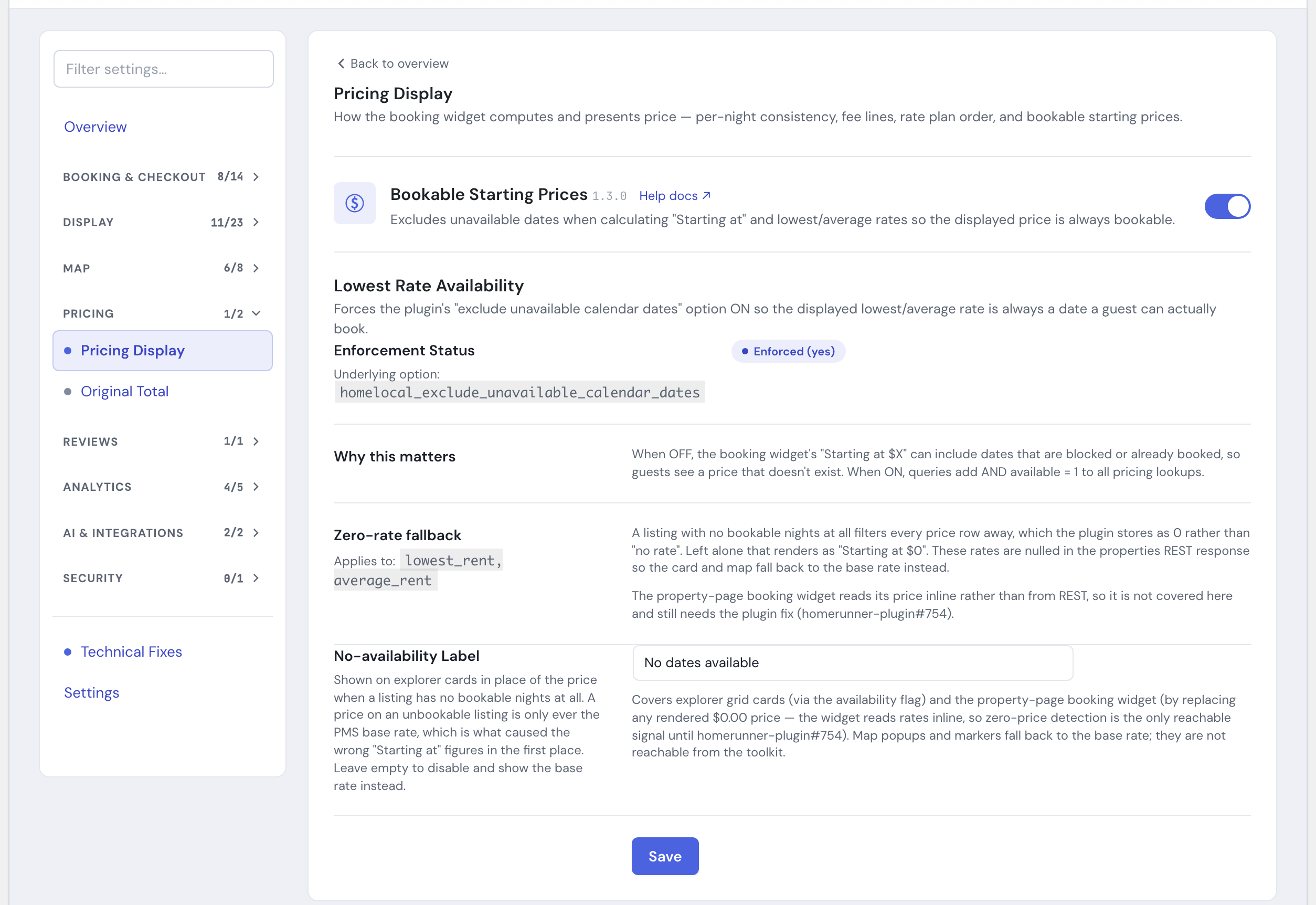
1. Enable the module #
Open the HomeRunner Toolkit Hub (the Toolkit screen under the HomeRunner menu in your WordPress admin) and switch on Bookable Starting Prices.
That is all that is required to fix the underlying pricing calculation. Switching the module off restores the previous setting.
2. Set a no-availability label (recommended) #
In the same panel, type a short label into No-availability Label, such as “No dates available” or “Fully booked.” Property cards and the map get the base-rate fallback automatically either way. The booking component does not: leave this blank and a fully booked listing there can still show $0, so set a label if your booking component shows starting prices.
Settings #
| Setting | What it controls |
|---|---|
| Enforcement Status | Read-only. Shows Enforced (yes) when the module is doing its job, or Not enforced otherwise. (The underlying option is homelocal_exclude_unavailable_calendar_dates.) |
| No-availability Label | Text shown on explorer cards and in the property-page booking component in place of a price, for any listing with no bookable nights at all. Default: “No dates available.” Leave empty to disable the label: property cards and the map still show the base rate, but the booking component stays unprotected and may show $0 on fully booked listings. |
Two things worth knowing about where the label reaches: it covers explorer grid cards and the property-page booking component. Map popups and markers are not covered and always fall back to the base rate, since the toolkit cannot reach into how the plugin renders the map.
Tips #
- Turn this on for any site that displays “Starting at” or lowest-rate pricing on property cards, listing grids, or the booking component. It is a quiet but high-value safeguard against guest frustration.
- After enabling, spot-check a property whose calendar has some blocked dates near the low season, and confirm the advertised rate matches the cheapest bookable night.
- Set the No-availability Label so the booking component gets the same fully-booked protection as your property cards and map. Leaving it blank is a reasonable choice for cards and the map alone: the base rate is still an honest, non-zero number there.
- Pair this with Rate Plan Control so both the price and the rate plan a guest sees first are accurate and bookable.
See the full module list in the Toolkit overview.