
Automatically invites your direct-booking guests to leave a review after their stay, then lets you approve each submission before it goes live.
What it does #
Direct bookings are great for your bottom line, but they do not come with the automatic review prompts that the big channels send. Review Requests closes that gap.
A few days after a guest checks out from a confirmed direct booking, it emails them a friendly request to review their stay, with a secure personal link to a simple review form. If they have not responded, it can send one gentle reminder.
Every submission lands in an approval queue. Nothing appears on your property pages until you approve it, so you stay in full control of what is published. Approved reviews are written into your site and are protected from being overwritten by platform syncs.
How to turn it on #
1. Open the Toolkit hub #
Go to HomeRunner → Toolkit in your WordPress admin.
2. Enable Review Requests #
Switch on Review Requests and open its settings.
3. Configure and enable sending #
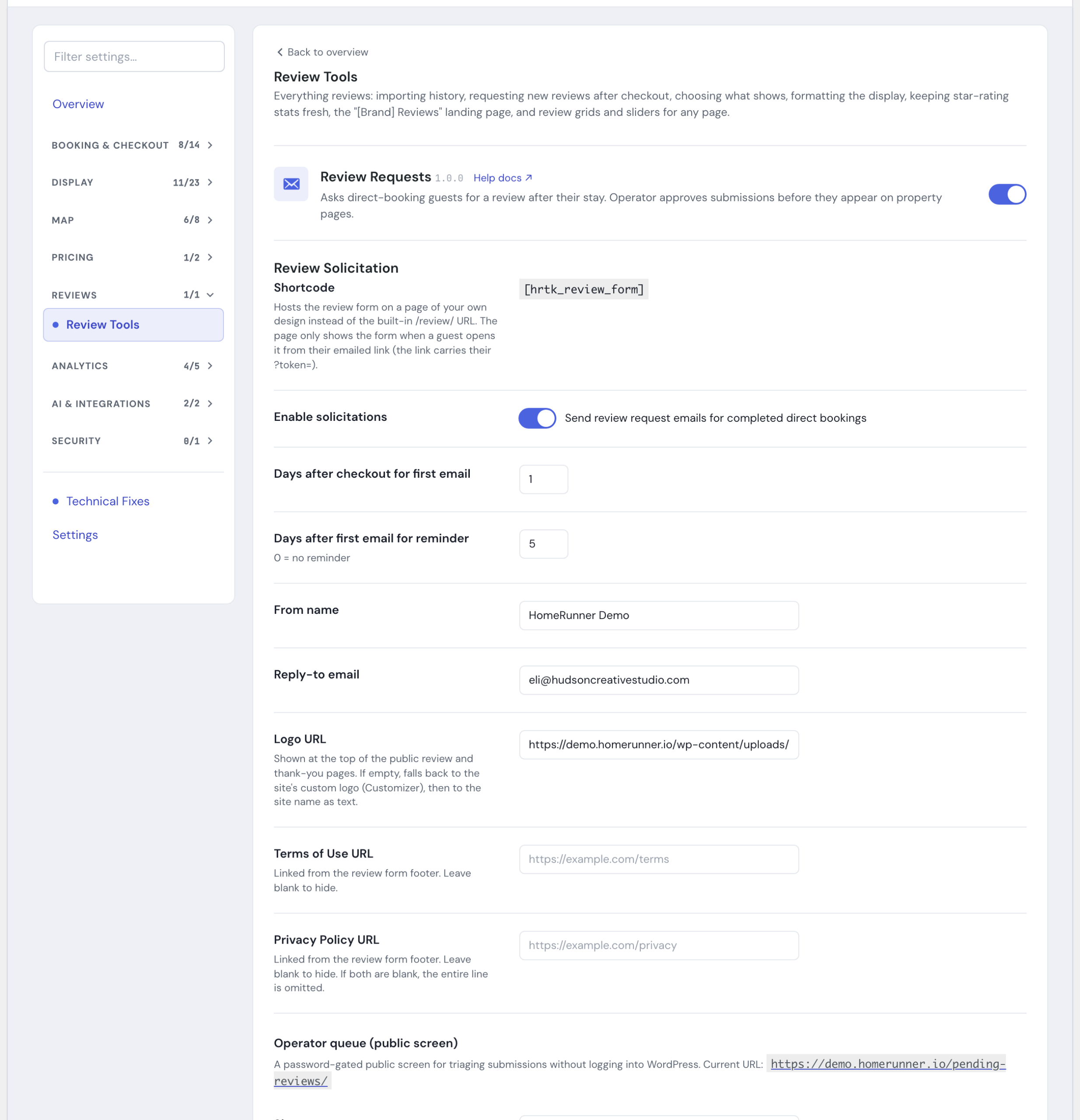
Tick Send review request emails for completed direct bookings, set your timing, sender, and branding details (below), and save.
Settings #
Timing #
- Days after checkout for first email (1 to 14, default 2). How long to wait before the first invitation.
- Days after first email for reminder (0 to 14, default 5). A follow-up nudge if the guest has not responded. Set to 0 to send no reminder.
Sender #
- From name. The name guests see the email come from. Defaults to your site name.
- Reply-to email. Where guest replies go. Defaults to your admin email.
Branding #
Shown on the review form, thank-you page, and approval queue, not in the invitation email itself.
- Logo URL. If left blank, falls back to your site’s Customizer logo, then to your site name as text.
- Terms of Use link and Privacy Policy link. Linked from the review form footer. Leave either blank to hide it; leave both blank to omit the line entirely.
Approval queue #
The approval queue is a password-gated page on your own site for reviewing submissions without logging into WordPress.
- Queue address (slug). The web address of the private queue page (defaults to
pending-reviews). - Queue password. Gates access to the queue. The queue stays off (returns a 404 to non-admins) until you set a password.
- Session length in hours (default 24). How long an operator stays signed in after entering the password.
In the queue you can approve, reject (with an optional reason), or reverse an earlier decision. Approving publishes the review to the property page; rejecting keeps it off your site. Reversing an approval moves the published review to your trash and returns the submission to pending.
Thank-you page #
The page a guest lands on after submitting adapts to the rating they gave. You can customize the headline, body copy, and button label/link for three tiers: high (4-5 stars), neutral (3 stars), and low (1-2 stars). Leave a field blank to use the built-in default: the high-rating default invites guests to share on Google, and the neutral/low defaults invite them to email you directly.
How guests qualify #
Invitations are sent only for confirmed direct bookings after checkout. Cancelled, closed, or non-direct reservations are skipped automatically. Personal review links expire after about two weeks, so old links cannot be reused.
To keep a single property out of solicitations, open it in the WordPress editor, find the Flags field, and check No review solicitation.
The review form link #
Every invitation email links straight to the guest’s personal review page, so most sites never need to touch this. If you would rather host that same form inside one of your own pages (wrapped in your site’s header and footer instead of the plain form page), place the [hrtk_review_form] shortcode on a page of your choosing. The shortcode reads the guest’s token from the link’s ?token= query string, so it only works when a guest arrives through their personal emailed link; visited without a token, it shows a short “no review token provided” message instead of a broken form.
Tips #
- Two to three days after checkout tends to land while the stay is still fresh but the guest is home and settled.
- Keep the reminder gentle and limit it to one. A single, well-timed nudge lifts response without feeling pushy.
- Set a recognizable From name and a real Reply-to so guests trust the email and can reach you.
- Bookmark your approval queue and check it regularly so good reviews go live quickly.
- Use the Send test email to me and Run discovery preview buttons in the settings panel to confirm everything is wired up correctly before waiting on a real checkout.
- If a settings-panel notice says SMTP was not detected, guest emails are going out through the default WordPress mailer, which some inboxes flag as spam. Configure an SMTP plugin (WP Mail SMTP, FluentSMTP, or similar) for reliable delivery.
Related #
- Toolkit overview
- Review Importer to bring in past reviews
- Review Visibility to curate what shows
- Under the Hood