
Shows a “due today / remaining before check-in” breakdown below the booking total when check-in is far enough out, so guests clearly understand they are only being charged a deposit now.
What it does #
Some PMS payment policies only collect a deposit at booking and charge the balance later, before check-in. Without a clear note, guests can be confused about why the amount charged does not match the total they saw.
Payment Split Notice closes that gap. When check-in is at least your configured number of days away, it adds a short breakdown below the booking total:
- A bold “Due today” line with the deposit amount
- A muted “Remaining” line with the balance due before check-in
For example, with a 30% deposit on a $1,000 stay, the guest sees “Due today (30%): $300” and “Remaining due before check-in: $700”.
For bookings closer than your threshold, the notice does not appear, because those are typically charged in full. The notice also recalculates on the spot when the total changes, such as when a guest applies a coupon or switches rate plans.
How to turn it on #
1. Enable the module #
Open the HomeRunner Toolkit Hub (the Toolkit screen under the HomeRunner menu in your WordPress admin) and switch on Payment Split Notice.
2. Match it to your PMS policy #
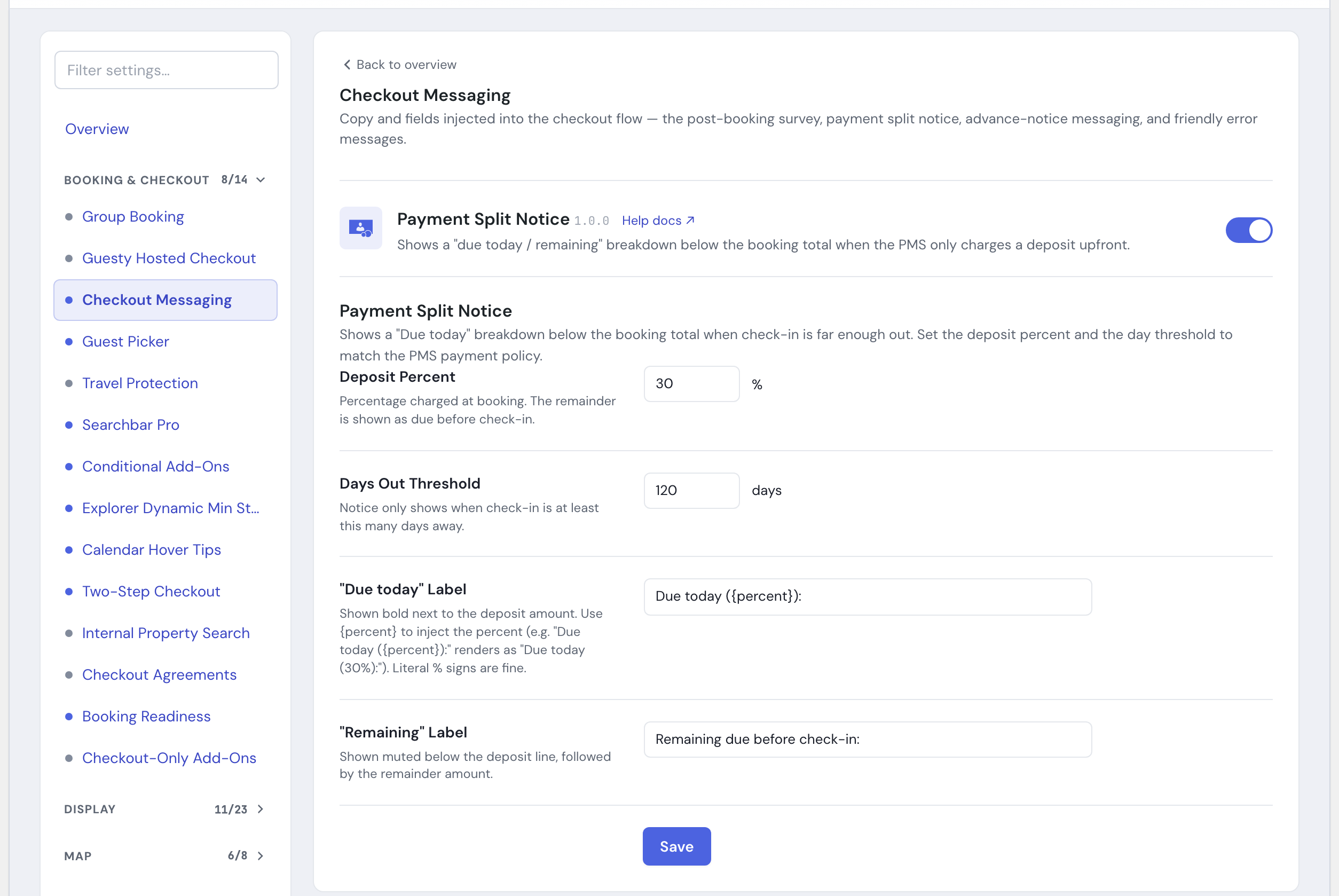
Open the Payment Split Notice settings panel and set the deposit percent and day threshold to match how your PMS actually charges (see Settings below).
3. Save #
Click Save. The notice appears under the booking total for qualifying stays.
Settings #
| Setting | What it controls |
|---|---|
| Deposit Percent | The percentage charged at booking. The remainder is shown as due before check-in. Default is 30% (range 1 to 99). |
| Days Out Threshold | The notice only shows when check-in is at least this many days away. Default is 120 days (range 1 to 365). |
| “Due today” Label | The bold label next to the deposit amount. Write {percent} where you want the deposit percent to appear; literal % signs are fine too. Default is “Due today ({percent}):”, which renders as “Due today (30%):”. |
| “Remaining” Label | The muted label shown next to the balance amount. Default is “Remaining due before check-in:”. |
Tips #
- The percent and threshold must match your PMS payment rules exactly. This module displays the split; it does not change how money is actually charged. If the numbers disagree, guests will be confused rather than reassured.
- Keep the labels short and reassuring, for example “Pay 30% now, the rest before you arrive.”
- The
{percent}token in the “Due today” label keeps the displayed percentage in sync if you change the deposit amount later. - The notice follows whichever rate plan the guest has selected, so it pairs well with Rate Plan Control.
See the full module list in the Toolkit overview.