
Travel Protection gives guests a separate insurance section after Guest Details on HomeRunner checkout. Each available plan shows its price for the stay and any supplied coverage details. Guests can choose one plan or continue without insurance. Other add-ons remain in the booking component, unless you turn on Add-On Showcase, which presents them as cards in the same part of the checkout page.
Before you enable it #
Use HomeRunner Toolkit 3.243.21 or later with HomeRunner core 2.5.5 or later. Upsells must be enabled for the account in Central, and insurance must be configured in Guesty and available for the quoted stay.
The module supports standard HomeRunner checkout and Toolkit Two-Step Checkout. Leave it off for Gravity Forms or custom checkout templates. Sites using the Guesty Checkout module keep their existing insurance interface and hosted checkout.
Enable Travel Protection #
- Open HomeRunner Toolkit in WordPress admin.
- Find Travel Protection under Booking and enable the module.
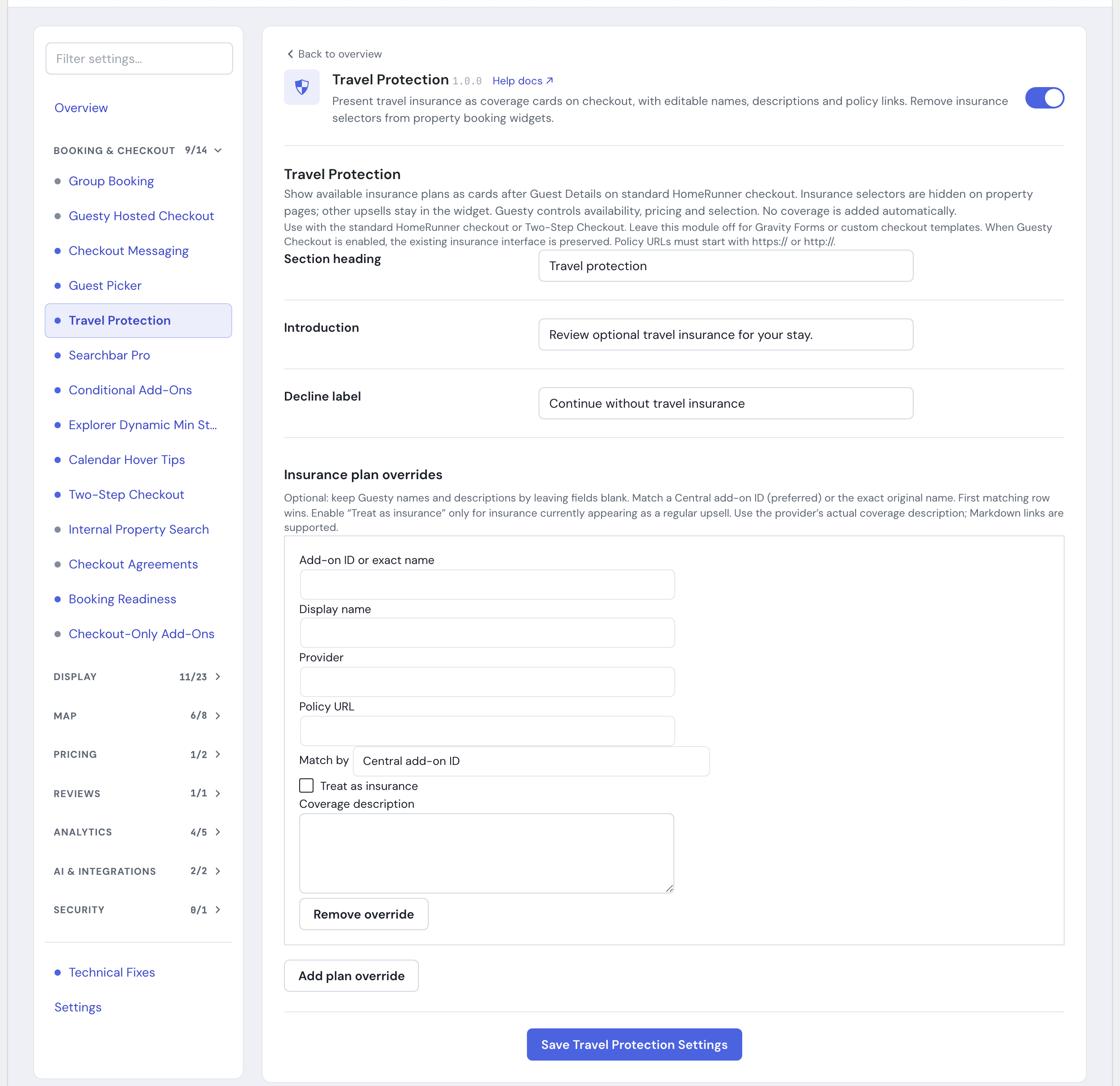
- Open its settings to change the section heading, introduction or decline label, then save.
- Open a property with available insurance, choose dates and continue to checkout. Confirm that the plans appear after Guest Details and that changing coverage updates the total.
The module is off by default. Enabling it removes insurance selectors from property booking components and puts the choice on supported checkout pages. With Two-Step Checkout, the section appears after the guest continues from Guest Details.
Customize plan details #
Insurance plan overrides are optional. Leave the display name and description blank to use the values supplied by Guesty.
Add an override using the Central add-on ID, or choose exact-name matching and enter the original plan name. Use the Central add-on ID when possible. The first matching override is used.
Set a guest-facing display name and description, and optionally add the provider name. Enter the full policy URL beginning with https:// or http://. Policy links open separately and do not select a plan. Descriptions support Markdown links.
Use the insurance provider’s actual coverage wording. Renaming a plan changes its presentation; Guesty continues to determine its availability and price.
Insurance appearing as a regular add-on #
For an insurance product shown with an add-on quantity control, create an override matching that exact product and enable Treat as insurance. This places it with the insurance choices so guests select at most one plan. Use this setting only for an insurance product, not for extras such as parking or pet fees.
A single available plan appears with the option to continue without insurance. Multiple plans appear as separate choices. No coverage is added automatically. If a guest has already selected coverage on the quote, checkout reflects that selection.
If the section is missing #
Confirm that the quote includes available insurance and that Upsells are enabled. A stay with no available insurance has no Travel Protection section.
Check the module settings for a HomeRunner compatibility notice. Older core versions retain their existing booking component. On standard checkout, confirm that the Guest Details section is present. If JavaScript optimization delays checkout scripts, exclude travel-protection.js and checkout-guest-step.js from delayed loading so the Two-Step sequence can initialize together.
If an insurance update fails, follow the notice shown on checkout. Refresh the page if the quote cannot be refreshed, and check the selected plan and total before continuing.
To return to the original insurance interface, disable Travel Protection in the Toolkit Hub.