
Card Rating shows the guest rating for each home on your search result cards and map popups: a star, the average, and the review count. Homes with fewer reviews than your minimum show nothing.
What it does #
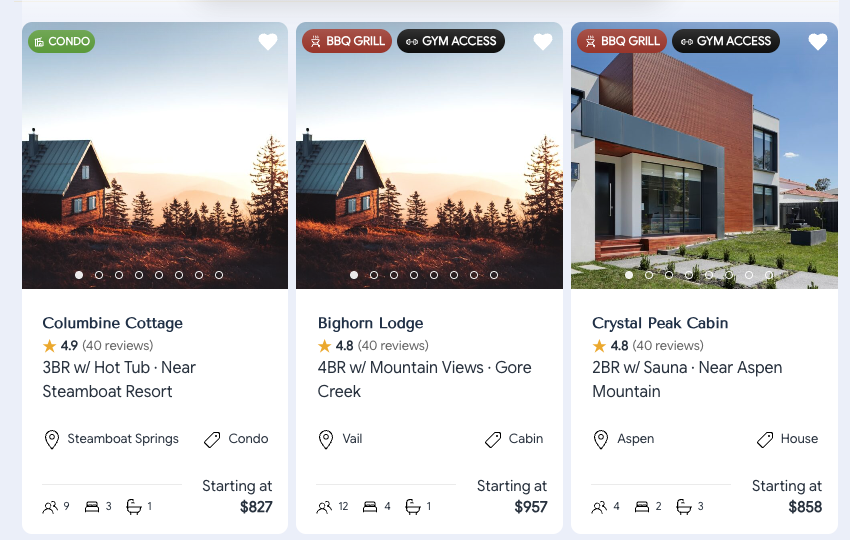
Guests comparing twenty homes in a row want the rating where they are looking, on the card. Your property pages already carry each home’s average rating and review count (Property Rating Stats keeps them current from your synced reviews). Card Rating puts that same number on the card and on the map popup, so the list, the map and the property page all agree.
For example, a home with 43 reviews averaging 5.0 shows ★ 5.0 (43 reviews) under its name on every results card and in its map popup. A new home with two reviews shows no rating until it reaches your minimum.
What your guests see:
- A rating line on every search result card, under the home name by default, including cards that appear after Load More or after filtering.
- The same line in the map popup when they click a pin.
- Nothing on a home below your minimum review count, and no empty space left in the layout.
Card Rating does nothing on a site with no synced reviews. Turn on Property Rating Stats first if your properties do not carry a rating yet.
Settings #
Open HomeRunner Toolkit in your WordPress admin, turn on Card Rating under Reviews, and open its panel.
- Minimum reviews (3): a home shows its rating once it has at least this many reviews. Three matches the rule most sites use on the property page.
- Decimals (1): one shows 5.0, zero shows 5.
- Review count: show the count in parentheses after the average, or the average alone.
- Count label: “reviews”, “ratings”, or the number alone, so the card reads (40 reviews), (40 ratings) or (40).
- Position on cards: under the home name, or on the location line after the town.
- Map popups: show the same line on the map popup card, so list and map match.
- Star color and text size.
Good to know #
- The HomeRunner explorer has its own small star beside the home name (“Hide rating” in the explorer settings, hidden by default). Card Rating hides that star on any card it decorates, so the two never show together.
- The line only appears where the search results are on the page. It adds no requests: the rating rides along with the property data the results already load.
- A screen reader hears the full sentence, for example “Rated 4.9 out of 5 from 40 reviews”, whichever count label you pick.
- To restyle the line from your theme, use the variables in the Toolkit Styling Reference.