
A manager who advertises on Google and Meta usually sees the clicks and rarely sees which of them became bookings. The cause is almost always the booking engine. The moment a guest clicks Book Now they are sent to a different domain, and the ad platforms lose the thread. HomeRunner keeps the whole booking on your own domain, and that one design decision is what makes tracking work without workarounds.
Why a hosted booking engine breaks attribution #
A hosted booking engine lives on the vendor’s domain or on a subdomain it controls. When Book Now sends the guest there, the browser treats it as a new site. The cookies that GA4 and the Meta Pixel set on your domain do not follow. The click IDs that Google and Meta append to the ad link (gclid and fbclid) stay behind on the first page, and a new session starts. If a purchase event fires at all, it fires on a domain where you cannot place your own tags. GA4’s cross-domain linking can bridge part of this, but only when the vendor’s pages carry the linker parameter and run your tags.
Where the booking happens with HomeRunner #
Search, the property pages, checkout and the confirmation page all render on your domain, inside your own header and footer. There is no subdomain and no redirect at checkout. The last URL the guest sees is something like yourdomain.com/confirmation, a first-party page like any other.
The pages arrive in one of two ways.
- On WordPress, the HomeRunner plugin renders them as part of your site.
- On other platforms, a Cloudflare Worker sits in front of your site at the edge. It serves the booking routes by fetching your own template page as the shell, keeping your header, footer and every script tag, and inserting the rendered content. A Guesty Advanced Website runs this way.
- Fetch your template page and keep it as the shell: header, footer and every script tag, your tag container included.
- Render the booking route the guest asked for: search, property, checkout or confirmation.
- Stitch the two and serve the page on your domain, from the edge.
The plugin renders the pages #
Same domain, same theme, same tags. Nothing to proxy.
A Cloudflare Worker serves the booking routes #
A Guesty Advanced Website runs this way. The guest and the browser see one site.
Either way, the session that started on the ad click ends on your confirmation page with no change of domain.
Your tags keep running #
Because the pages are yours, your Google Tag Manager container, GA4 property and Meta Pixel stay live through the entire flow. You do not install anything HomeRunner-specific in your container.
PageView fires on every page. The dashed chips replace purchase and Purchase for inquiries that are not yet confirmed bookings.
The HomeRunner plugin pushes the standard GA4 ecommerce events into the data layer as the guest moves through the site:
- view_item_list when results render
- select_item when a guest opens a property
- search when a search is submitted
- view_item on the property page
- begin_checkout when the checkout page loads
- purchase on the confirmation page, with the booking total, currency and a unique transaction ID
- generate_lead in place of purchase for inquiries that are not yet confirmed bookings
These are plain window.dataLayer pushes in the shape GA4 expects, so any container on the page can read them. There are two ways to wire them up. Enter your own GA4 Measurement ID, GTM Container ID and Meta Pixel ID in the Toolkit’s Conversion Tracking module, and the site reports to your accounts instead of HomeRunner’s default tags. Or switch on Self-Managed Analytics, which removes every HomeRunner-owned tag and leaves your own container in charge while the booking events keep flowing. The container side, triggers and GA4 tags, is walked through in How to configure Google Tag Manager to forward ecommerce events to GA4.
window.dataLayer.push({
  event: "purchase",
  ecommerce: {
    transaction_id: "184201",      // the reservation's unique ID
    currency: "EUR",
    value: 1960.00,                // booking total
    tax: 160.00,
    items: [
      { item_id: "5824", item_name: "villa marisol", price: 240.00, quantity: 7 },
      { item_id: "cleaning-fee", item_name: "cleaning fee", price: 120.00, quantity: 1 },
      { item_id: "taxes", item_name: "taxes", price: 160.00, quantity: 1 }
    ]
  }
});Meta Pixel with revenue #
The Toolkit includes a native Meta Pixel integration. Enable Conversion Tracking in the HomeRunner Toolkit hub and enter your Pixel ID. The site then fires PageView on every page, ViewContent on property pages, InitiateCheckout when the guest reaches the checkout form, and Purchase on the confirmation page with the booking total and currency attached. Lead fires when a guest sends an inquiry or completes a site form.
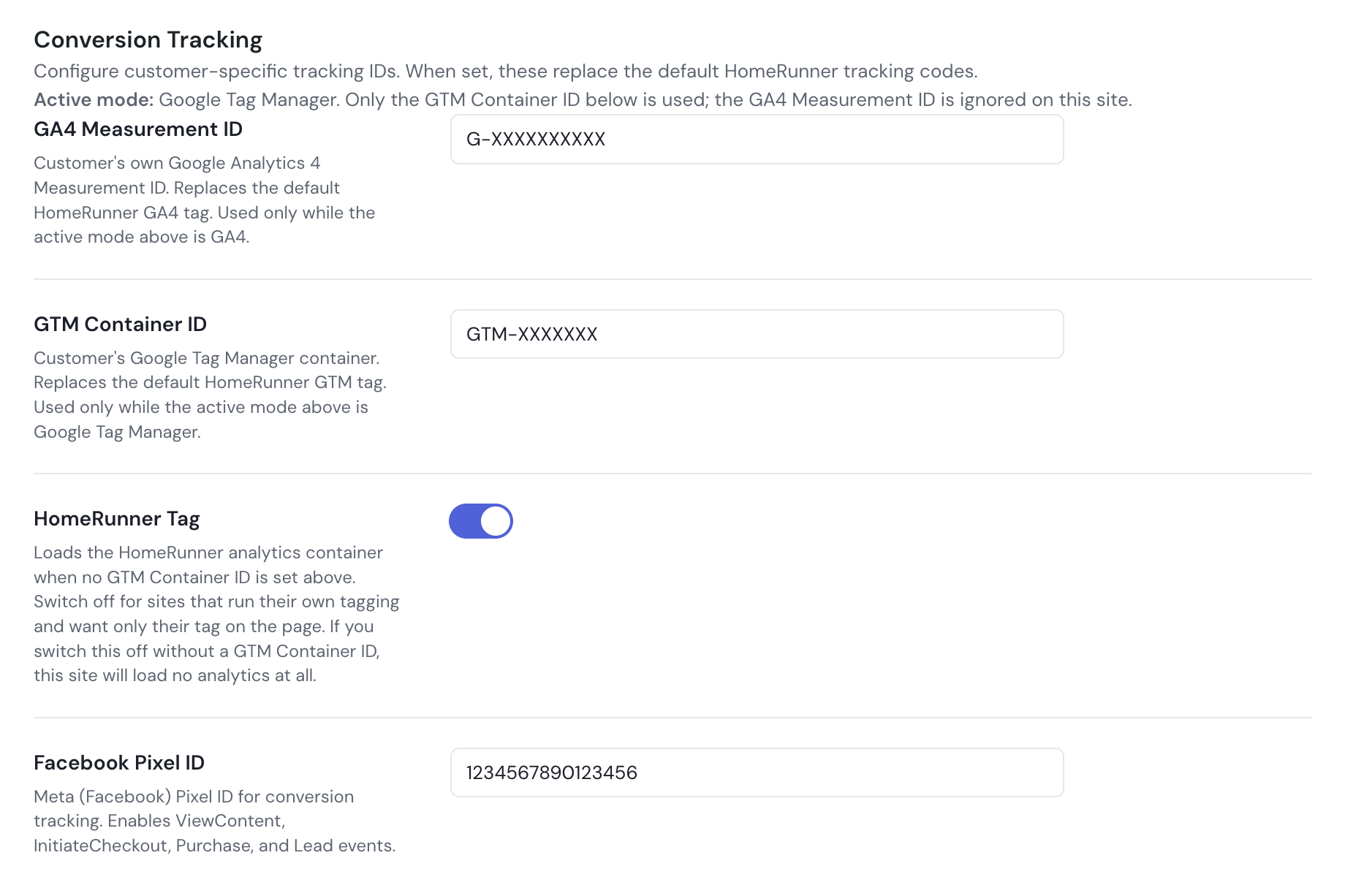
Once it is on, remove any other copy of the pixel base code, whether a header snippet or a Custom HTML tag in Tag Manager. Two copies of the base code mean two PageViews per load and two Purchases per booking.
Checking it works #
Open Tag Manager’s preview mode and walk the site. A property page shows view_item, the checkout page shows begin_checkout, and a test booking ends with a purchase event carrying the amount. In Meta Events Manager, the Test Events tab should show one PageView per page load, a ViewContent on each property page, and the completed booking as a Purchase with a value. Two PageViews per load means a second copy of the base code is still on the site.
view_itemon a property pagebegin_checkouton the checkout pagepurchasewith value and transaction ID after a test booking
- One PageView per page load
- ViewContent on each property page
- Purchase with a value for the completed booking
- Two PageViews per load: a second copy of the base code is still on the site
- Purchase without a value: a hand-placed snippet or Custom HTML tag is still firing
Engine only, existing site #
You do not need a new website for any of this. HomeRunner adds search, property pages and checkout to a WordPress site or a Guesty Advanced Website, synced to your PMS, and every other page stays as built. The booking pages inherit your design and your domain, and your tags run on them unchanged. From the ad platforms’ side it is one guest journey, click to confirmation.