
Table of Contents
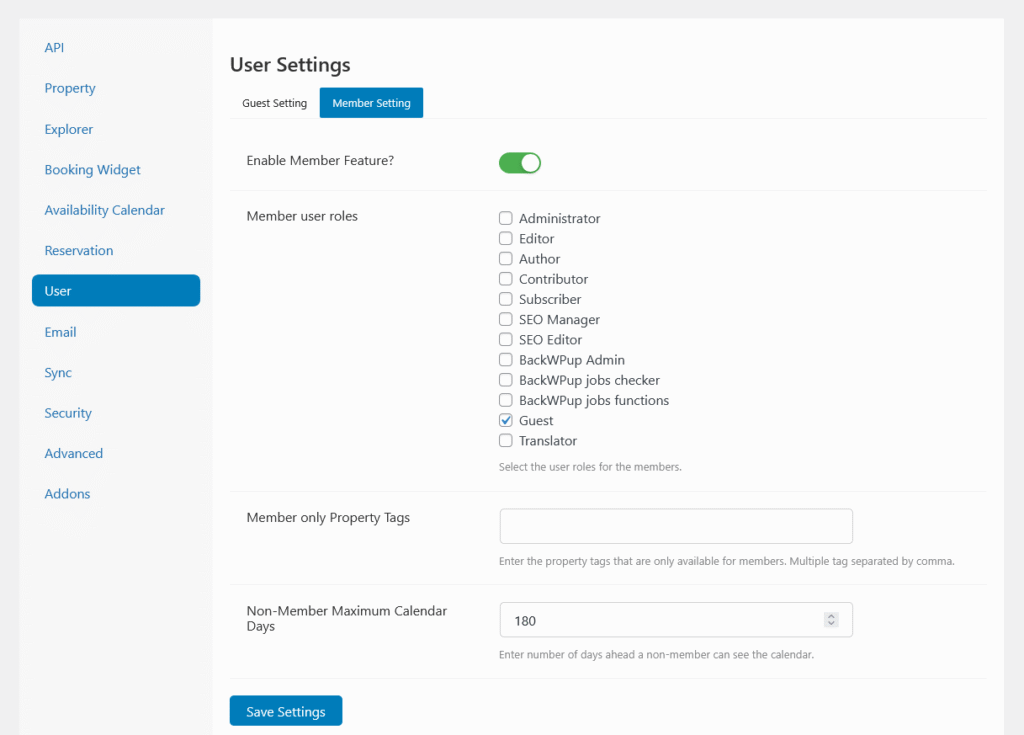
The Membership feature in HomeRunner allows site admins to control how much property availability information is visible to visitors and members. This helps you provide early access or premium visibility for specific users or property groups.
📅 Availability Access Control #
When the Membership feature is enabled, you’ll see options to limit how far ahead visitors can view property availability.
- Visitor availability window — Adjust the date range so that non-members can only check availability up to a specific future date.
- Member default window — Members automatically see full or extended availability beyond the public limit.
Example: If you set the visitor limit to 30 days, visitors will only see open dates for the next month, while logged-in members can view the entire calendar.
🏷️ Property Tag Restriction #
Admins can also choose specific property tags (custom taxonomy terms) that define which listings are visible to members.
- Only properties under the selected tags will be displayed to members.
- Properties without those tags remain hidden from member views.
This makes it easy to create exclusive member-only collections such as:
- “Early Access” listings
- “Premium Rentals”
- “Verified Hosts”
⚙️ Managing Settings #
- Go to HomeRunner → Settings → Membership.
- Enable the Membership toggle.
- Adjust the Visitor availability window and Member default window dates.
- Select property tags to restrict access for members.
- Click Save Changes.
💡 Tips #
- Use this feature to reward registered users with more booking visibility.
- Combine tag-based access with custom roles or pricing to create premium tiers.
- If you use caching, clear it after changing membership visibility rules to ensure proper behavior.