
This guide explains how to safely customize the Single Property page layout using HomeRunner Developer Tools, without modifying core plugin files or losing changes on updates.
What This Does (In Plain Terms) #
HomeRunner can generate a separate template plugin that contains all template files used to render a single property page.
- The core HomeRunner plugin stays untouched
- Templates live in a dedicated plugin
- You can edit templates using WordPress admin or FTP
- Your changes survive HomeRunner updates
Requirements #
- HomeRunner plugin installed and active
- WordPress administrator access
- Basic PHP & WordPress template knowledge
How It Works #
- HomeRunner generates a plugin named:
homerunner-property-template - This plugin contains:
single-property.php- All related
property/*partial templates
- When active, HomeRunner automatically loads templates from this plugin instead of its internal defaults
Step 1: Generate the Template Plugin #
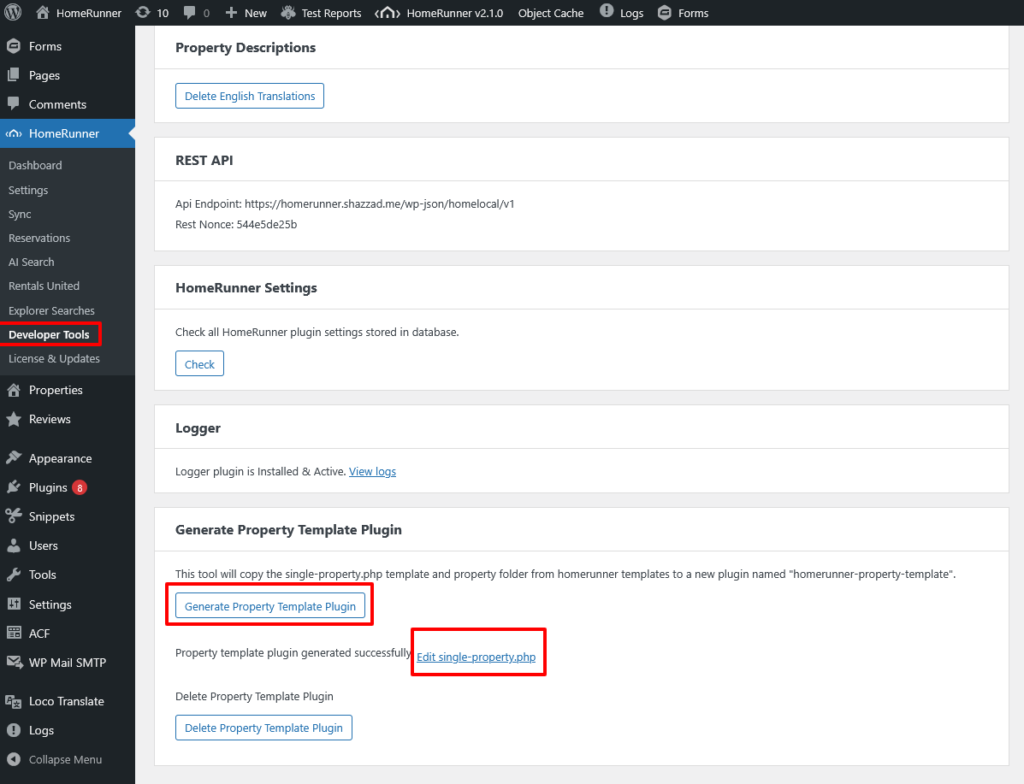
- Go to WordPress Admin → HomeRunner → Developer Tools
- Find Generate Property Template Plugin
- Click Generate
- Confirm when prompted
✅ A success message confirms the plugin was created.
⚠️ Generating again will overwrite existing template customizations.
Step 2: Edit the Template #
You can edit the template in following way:
- Go to Plugins → Plugin File Editor
- Select HomeRunner Property Template
- Open
templates/single-property.php - Edit and save
Step 3: Customize the Template #
Inside single-property.php, you can:
- Change layout and markup
- Add or remove sections
- Modify property data output
- Edit included partials (e.g.
property/photos-slider.php) - Add custom HTML, CSS, or hooks
Important Notes #
- All related
property/*partial templates are copied into the plugin - Includes use relative paths, so internal structure must remain intact
- Changes persist unless the plugin is regenerated
File Structure #
wp-content/plugins/
  homerunner-property-template/
    templates/
      single-property.php
      property/
        photos-slider.php
        amenities.php
        pricing.php
        ...
Regenerating the Template Plugin #
Use this if you want to reset templates to the latest HomeRunner defaults.
- Go to HomeRunner → Developer Tools
- Click Generate Property Template Plugin
- Confirm overwrite
⚠️ Warning:
This will overwrite all custom edits.
Backup your files before regenerating.
Deleting the Template Plugin #
To completely remove custom templates:
- Deactivate HomeRunner Property Template from Plugins
- Go to HomeRunner → Developer Tools
- Click Delete Property Template Plugin
- Confirm deletion
This removes the plugin and all template files.
Best Practices #
- Backup before regenerating
- Use Git if possible for tracking changes
- Test changes on staging before production
- Avoid adding business logic inside templates
- Keep templates focused on rendering only
Troubleshooting #
Plugin Editor Is Disabled #
Some hosts disable the plugin editor.
Solution:
- Use FTP / SFTP
- Edit files directly at:
wp-content/plugins/homerunner-property-template/
Changes Not Showing #
- Clear WordPress cache
- Clear browser cache
- Clear any server / CDN cache
- Confirm file was saved successfully
Template Not Loading #
Check:
- Plugin exists and is active
templates/single-property.phpexists- File permissions (644 files, 755 folders)
- WordPress debug log for PHP errors
Summary #
- HomeRunner uses a template plugin for safe customization
- Templates are editable via WordPress admin or FTP
- Core plugin updates won’t overwrite your changes
- Regeneration resets everything — backup first